기본중에 기본
엑셀파일 업로드/다운로드 기능 구현에 대해 여러가지 게시글을 봤지만
단박에 이해하기 어려운 경향이 있다고 느껴 직접 포스팅 해보기로했다.
(업로드는 다음에 이어 게시..)
DB 데이터를 엑셀파일 형태로 다운로드 할 수 있도록 하는 기능은 데이터 관리에서 필수인데,
다음(JDBC 동적 연결 구현)을 이해하기 위해서는 기본을 먼저 알아야한다.
※ POI 라이브러리를 이용한 Excel Download 기능 구현
▷ 요약 설명
poi dependency 추가 → front 단의 버튼과 script 작성 → excel download API Controller 작성 → Service 에서 구현
1. pom.xml 에서 POI 라이브러리를 사용하기 위한 의존성 (dependency) 추가
<dependencies>
	<!-- excel download -->
	<dependency>
		<groupId>org.apache.poi</groupId>
		<artifactId>poi-ooxml</artifactId>
		<version>3.15</version>
	</dependency>
</dependencies>
2. index.jsp 파일 작성 (jsp 파일에 html + script로 작성했다.)
<div>
    <div class="input-group-btn" id="excelDownloadBtn">
        <button class="btn btn-default" onclick="excelDownload()">
            <span>엑셀 다운로드</span>
        </button>
    </div>
</div>
function excelDownload(){
$.ajax({
url : '/file/excel',
type : 'GET',
xhrFields: {
responseType: 'blob'
},
success : function(response) {
var link = document.createElement('a'); //a태그 생성
link.href = window.URL.createObjectURL(response); //bolb로 받아온 데이터로 create
link.download = "sample.xlsx"; // 다운받는 엑셀파일 name
link.click();
},
beforeSend : function() {
$('.wrap-loading').removeClass('display-none');
},
complete : function() {
$('.wrap-loading').addClass('display-none');
},
error : function(err) {
console.log(err);
}
});
}
3. "/file/excel" API 연결 Controller.java 생성
@Controller
@RequiredArgsConstructor
public class ExcelController {

	private final ExcelService excelService;

	@RequestMapping("/file/excel")
	public void excelDownload(HttpServletRequest request, HttpServletResponse response) throws IOException {
		excelService.excelDownload(request, response);
	}
}
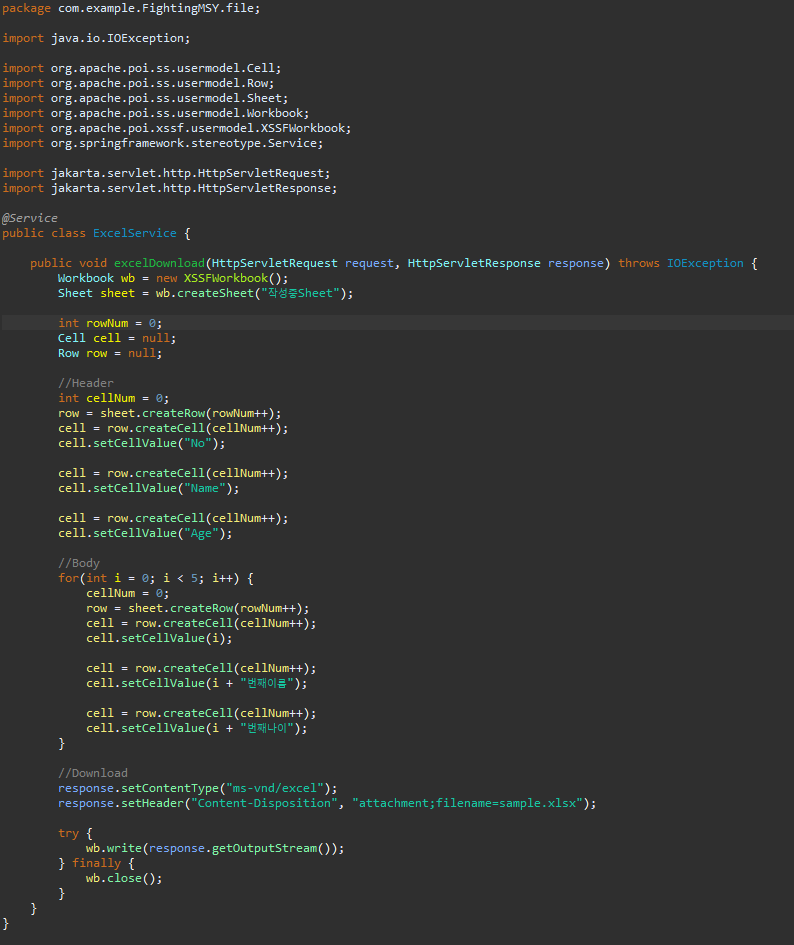
4. Service.java 에서 excel 파일 생성을 위한 코드 작성
@Service
public class ExcelService {

	public void excelDownload(HttpServletRequest request, HttpServletResponse response)
    throws IOException {
		Workbook wb = new XSSFWorkbook();
		Sheet sheet = wb.createSheet("작성중Sheet"); //엑셀 sheet 이름

		int rowNum = 0;
		Cell cell = null;
		Row row = null;

		//Header
		int cellNum = 0; // (a, 1)
		row = sheet.createRow(rowNum++); //sheet row에 create시작

		cell = row.createCell(cellNum++); // 첫번째 cell, 첫번째 column
		cell.setCellValue("No"); // 값1

		cell = row.createCell(cellNum++); // 두번째 cell, 두번째 column
		cell.setCellValue("Name"); // 값2

		cell = row.createCell(cellNum++); // 세번째 cell, 세번째 column
		cell.setCellValue("Age"); // 값3

		//Body
		for(int i = 0; i < 5; i++) { //원하는 row 개수만큼 반복
			cellNum = 0; // (a, 2)
			row = sheet.createRow(rowNum++); //sheet row에 create시작

			cell = row.createCell(i); // cell 값
			cell.setCellValue(i); // 첫번째 컬럼의 cell 값

			cell = row.createCell(i);
			cell.setCellValue(i + "번째이름"); // 두번째 컬럼의 cell 값

			cell = row.createCell(i);
			cell.setCellValue(i + "번째나이"); // 세번째 컬럼의 cell 값
		}

		//Download
		response.setContentType("ms-vnd/excel");
		response.setHeader("Content-Disposition", "attachment;filename=sample.xlsx");

		try {
			wb.write(response.getOutputStream());
		} finally {
			wb.close();
		}
	}
}
5. 만들어놓은 front쪽 Download 버튼을 클릭하면, 엑셀 다운로드 파일 확인 가능

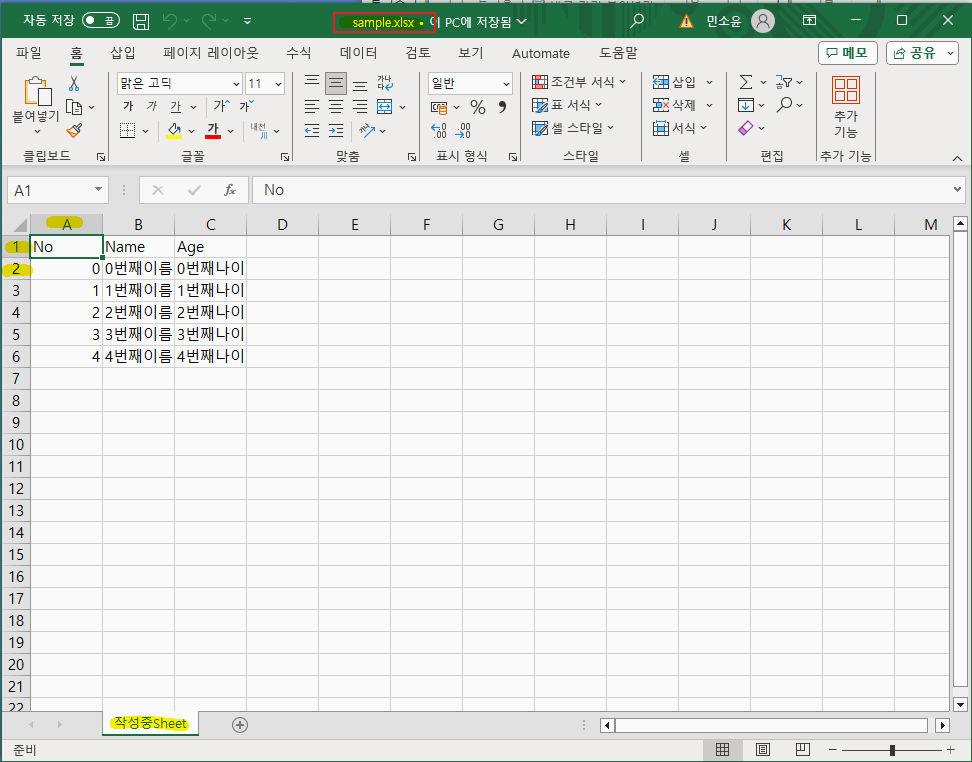
엑셀 다운로드 및 파일 확인 성공!
(구현 소스 스크린샷 참고)


300x250
'웹 > Spring' 카테고리의 다른 글
| [Spring] Spring Controller 메소드 리턴타입 정리 (0) | 2024.01.30 |
|---|---|
| [Spring] @Aurowired 의존성 주입(Dependency Injection) (0) | 2024.01.29 |
| [Spring Boot] 0.3. Filter Check Uri 설정하기(SpringMVC) (0) | 2024.01.24 |
| [Spring Boot] 0.2. MyBatis 연동하기(이클립스/mysql/SpringMVC) (0) | 2024.01.18 |
| [Spring Boot] 0.1.Project 세팅하기(이클립스/spring.io/maven/war) (0) | 2024.01.17 |